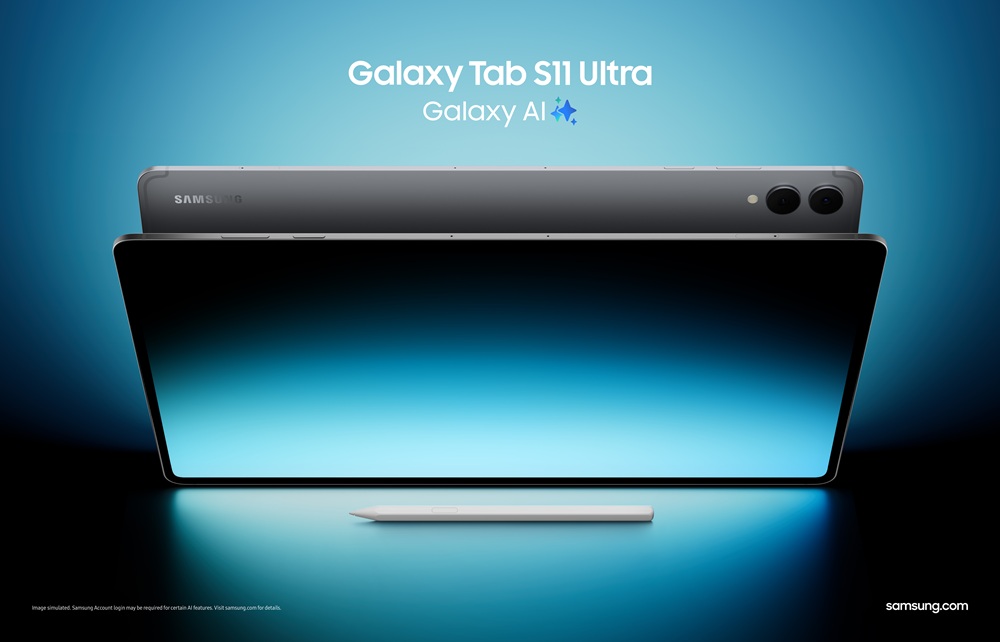
Galaxy Tab S11 series
delivers the latest Galaxy AI features and a more powerful Samsung DeX
experience – thin and light tablets designed for effortless productivity
●
Advanced AI and redesigned S Pen: One UI 8 enables more natural
and intuitive interactions, while a redesigned S Pen offers improved comfort
and control for both writing and drawing, enabling users to experience next
level of creativity and productivity
●
Smarter multitasking with Samsung DeX: New Extended Mode
transforms your Galaxy Tab S11 Ultra and an external monitor into a true
dual-screen setup, while users can create up to four customizable workspaces
for different needs.
●
Slim and powerful: With a 3nm processor and Samsung’s thinnest
tablet design yet, Galaxy Tab S11 Ultra delivers fast, smooth performance in a
portable form.
SEOUL, Korea – September,
2025 – Samsung
Electronics Co., Ltd. today announced the Galaxy Tab S11 Ultra and Galaxy Tab
S11, delivering its most intelligent and advanced tablet experience yet.
Powered by the latest Galaxy AI[1], now
enhanced by One UI 8[2] and new
multimodal capabilities, Galaxy Tab S11 Ultra is the thinnest Galaxy Tab to
date, without compromising performance, going beyond a slim form factor to show
what a premium tablet can be. Together, the series is built for effortless
productivity on the go, combining pro-grade hardware with experiences optimized
for a large screen.
With upgraded Samsung DeX and a redesigned S Pen, the Galaxy Tab S11
Ultra supports focused multitasking and seamless workflows, while also enabling
creative expression in a sleek, portable form. Whether capturing ideas in a
meeting, summarizing lecture notes or sketching out visual concepts, the Galaxy
Tab S11 Ultra empowers users to handle more with less friction, wherever they
are.
“The Galaxy Tab S11 series combines AI innovation with refined hardware
to deliver a true multitasking experience that reflects Samsung’s deep
experience in mobile productivity,” said Jay Kim, Executive Vice President and
Head of Customer Experience Office, Mobile eXperience Business at Samsung
Electronics. “With the latest Galaxy AI and new multimodal capabilities, these
flagship tablets enable ultimate efficiency – empowering users to work, create
and flow more naturally across a versatile, large screen.”
Powering Everyday Tasks with
Advanced AI
With One UI 8, the Galaxy Tab S11 series brings multimodal AI to the
forefront – understanding what users type, say and see, and responding in real
time with helpful suggestions, these tools unlock a more fluid way to work,
create and stay in flow across any task.
●
Gemini Live[3] enables real-time screen sharing and
visual input, so users can have a natural conversation with Gemini about what
they’re looking at. Whether it’s on-screen content or an object that someone
wants to show by pointing the camera at it – Gemini Live can handle contextual
questions and requests by seeing what the user sees. For instance, a user in a
class can easily screen share their notes, then ask Gemini to interpret a chart
or explain the study material and summarize its insights.
●
By pressing and holding the side button, users can activate Gemini
and carry out commands across apps with a single command. For instance, when
there’s no time to read a lengthy article, users can share the link with Gemini
and say, “Summarize this article and save it to Samsung Notes,” making it
easier to catch up later. It simplifies complex actions so users can stay in
their flow.
The Galaxy Tab S11 series is packed with additional tools for effortless
productivity and creativity – including the full suite of Galaxy AI features,
optimized for the large screen.
●
Users can turn rough sketches into clean visuals with Drawing Assist[4],
then drag and drop[5]
images they’ve created into Samsung Notes as a starting point for further
ideation – perfect for brainstorming, visual planning or creative exploration.
●
Writing Assist[6] helps rework tone and style, so
users can easily refine a piece of writing to ensure it matches their intended
meaning before dropping it into an email, document or other apps.
●
While multitasking, users can keep Galaxy AI close at hand as a
moveable and compact overlay, presented in a floating view,[7] allowing them to summarize
the content on their screen without breaking focus.
●
Circle to Search[8] with Google is now even more helpful
for getting context and diving deeper into anything users see on their device's
screen. Users are able to translate text in real-time as they scroll and
interact. From news articles to social media posts, users will see instant,
on-screen translations of the underlying text in their preferred language.
●
The Galaxy Tab S11 series comes with the newly redesigned S Pen that’s built for both focused
work and creative expression. Its new cone-shaped pen tip supports increased
tilt angles for better control, while a hexagonal design provides a more
natural, ergonomic feel that’s comfortable and stable in the hand. Quick Tools[9] make it easy to adjust on
the fly while drawing or editing with floating access, while Sticky Note lets users capture sudden
thoughts or to-dos directly over Samsung Notes – no more app switching required
during document review.
Full-Scale Productivity
In addition to Galaxy AI, the enhanced Samsung DeX[10]
on the Galaxy Tab S11 series empowers users to maximize their productivity when
multitasking across apps, taking notes during meetings or simply mapping out
ideas. Whether you’re a designer building out visual concepts or a frequent
traveler planning a trip across apps and displays, the Galaxy Tab S11 series
features support every step, from researching and sketching to sharing polished
results.
The latest Samsung DeX upgrades unlock next-level productivity, starting
with Extended Mode, which transforms Galaxy Tab S11 and an external monitor
into a seamless dual-screen setup. It runs Samsung DeX across both screens
simultaneously for more intuitive multitasking and greater flexibility – now
users can drag and drop apps between displays or reference a document on one
screen while presenting on the other. Also new to Samsung DeX, users can now
create up to four separate,
customized workspaces for different needs. For example, one workspace can be
dedicated for work, another to creative projects and a third to planning a
trip.
With the upgraded Samsung DeX, users can set up a full working
environment from virtually anywhere – whether it’s connecting to a meeting room
TV for a presentation or adding final touches to a work document at the airport
lounge just before starting a vacation.
Combined with in-box Book Cover Keyboard Slim, the Galaxy Tab S11 series
easily transforms into a personalized, mobile workstation with instant access
to AI assistants through the dedicated Galaxy AI Key.
Made to Perform, Built to
Move
The Galaxy Tab S11 series delivers its most advanced performance yet,
equipped with cutting-edge hardware and immersive visuals in a slim, highly
portable design. Samsung brings its enhanced 3nm processor to Galaxy Tab for
the first time in the S11 series, offering faster processing, smoother
multitasking and more responsive AI features. Galaxy Tab S11 Ultra boasts
performance improvements of 33% in NPU, 24% in CPU and 27% in GPU[11].
Additionally, a powerful battery[12] and
efficient thermal management ensure reliable, long-lasting use for work,
creativity and everything in between.
Performance matched by purposeful design reflects Samsung’s hardware
innovation – delivering ultra-thin and light, yet powerful devices ready for
everyday versatility. Galaxy Tab S11 Ultra features a remarkably slim build at
just 5.1 mm[13], with
narrow 5.2 mm bezels[14] that
expand screen space without compromising portability. Across both models,
Dynamic AMOLED 2X displays deliver up to 1600 nits of peak brightness[15], ensuring
clear, vivid visuals indoors or out, so users can stay focused wherever they
work.
Tools That Fit the Way Users
Work
The Galaxy Tab S11 series makes it easy to get started with work or
creative projects with extensive third-party apps[16].
There is easy access to Goodnotes, Clip Studio Paint, LumaFusion and Notion –
supporting everything from sketching and note-taking to flexible project
planning. Galaxy users also enjoy exclusive benefits, with special offers
that make it easier to explore these premium tools, work smarter and unlock
their creative potential. Goodnotes[17]
offers a 1-year free version, Clip Studio Paint[18]
comes with a 6-month free trial with 20% off your first subscription and users
can get 66% off LumaFusion[19] along
with a one-month free Creator Pass. Notion[20]
also comes with a one-month free trial of its Plus plan with Notion AI,
providing added flexibility for writing, planning and organization.
In addition to these apps, users can explore a broader range of options
that support different needs. Noteshelf 3[21]
offers customizable layouts for capturing and organizing ideas. ArcSite[22] empowers
users with precision tools to turn creative sketches into CAD layouts.
Sketchbook provides an intuitive space for illustration and concept art, and
Picsart[23] enables
creators to bring their imagination to life through its own AI-driven design
tools. Whether users are working on creative portfolios or need to boost
productivity, these tools are designed to simplify everyday tasks and
streamline workflows.
Launching as the first Galaxy tablet to feature One UI 8, the Galaxy Tab
S11 series delivers a more seamless, intelligent AI experience. One UI 8 will
expand to other previous generations of Galaxy devices, including the Galaxy
Tab S10 series, starting in October.[24]
Availability
The Galaxy Tab S11 series will be available starting September 26 in
select markets and offered in the color[25]
Gray. For more information about the Galaxy Tab S11 series, please visit: https://www.samsung.com/ph/tablets/galaxy-tab-s/galaxy-tab-s11-ultra-gray-256gb-sm-x936bzadxtc/.
See SRP below for your reference:
|
Tab S11
|
Wi-Fi
|
₱52,990
|
|
Tab S11
|
5G
|
₱61,990
|
|
Tab S11 Ultra
|
(256GB)
|
₱85,990
|
|
Tab S11 Ultra
|
(512GB, eStore Exclusive)
|
₱91,990
|
About Samsung Electronics Co., Ltd.
Samsung inspires
the world and shapes the future with transformative ideas and technologies. The
company is redefining the worlds of TVs, digital signage, smartphones,
wearables, tablets, home appliances and network systems, as well as memory,
system LSI and foundry. Samsung is also advancing medical imaging technologies,
HVAC solutions and robotics, while creating innovative automotive and audio
products through Harman. With its SmartThings ecosystem, open collaboration
with partners, and integration of AI across its portfolio, Samsung delivers a
seamless and intelligent connected experience. For the latest news, please
visit the Samsung Newsroom at news.samsung.com.
Samsung Account login may be required to use certain AI
features. Samsung does not make any promises, assurances or guarantees as to
the accuracy, completeness or reliability of the output provided by AI
features. Availability of Galaxy AI features may vary depending on the
region/country, OS/One UI version, device model and phone carrier.
Some functional widgets may require a network connection
and/or Samsung Account login. Availability of functions supported within the
apps may vary by country.
Service availability may vary by country, language, device
model. Actual UX/UI may differ. Require internet connection. Works on
compatible apps and surfaces. Result may vary depending on visual matches. User
may need to update Android to the latest version. Google is a trademark of
Google LLC.
Drawing Assist feature requires a network connection and
Samsung Account login. A visible watermark is overlaid on the image output upon
saving in order to indicate that the image is generated by AI. The accuracy and
reliability of the generated output is not guaranteed.
Availability may vary across compatible apps, surfaces and
other factors.
Writing Assist requires a network connection and Samsung
Account login. Must meet length requirements to activate feature. Service
availability may vary by language. Accuracy of results is not guaranteed.
Supported only on Samsung Notes and Samsung Internet.
Available on select devices and internet connection
required. Works on compatible apps and surfaces. Result may vary depending on
visual matches. Check responses for accuracy.
Currently supported only on PENUP and Samsung Notes, UI may
vary by apps.
Samsung DeX wireless connection is supported with TVs that
support Android tablet screen mirroring(Miracast) only. There may be a
difference in performance depending on TV’s specifications and WiFi
environment. Recommended to use Samsung Smart TVs launched after '19. When
switching between displays, some apps may restart to adjust to the new screen
and certain data in the app may not be saved automatically. Behavior may vary
depending on the app and how it handles screen or mode changes.
The enhanced performance figures are based on a comparison
of Galaxy Tab S11 Ultra to Tab S10 Ultra. Actual performance will depend on
user environment, conditions and pre-installed software and applications.
Typical value tested under third-party laboratory
conditions. Typical value is the estimated average value considering the
deviation in battery capacity among the battery samples tested under IEC 61960
standard. Typical capacity is 11,600 mAh for Galaxy Tab S11 Ultra. Based on
Samsung internal lab test conditions with pre-release version of given model
connected to earphone via Bluetooth under default settings over LTE.
5.5 mm on the Galaxy Tab S11.
7.8
mm on the Galaxy Tab S11.
Galaxy
Tab S11 series has maximum brightness of 1600 nits and outdoor brightness of
1000 nits in High Brightness Mode.
App
availability and the terms of service may vary by country and region.
Goodnotes app requires a separate download from Galaxy Store
and comes with a 1-year free full version. Once the free full version period
ends, an additional purchase is required for continuous use. App availability
and the terms of service may vary by country and region.
Clip
Studio Paint membership required. Clip Studio Paint app comes pre-installed in
select markets. The app can be downloaded from Galaxy Store and comes with a
6-month free trial for first-time users. Once the free trial period ends, paid
subscription to a monthly or annual usage plan is required for continuous use.
A 20% discount is available on the first subscription.
LumaFusion app is preloaded as stub, requiring users to
click the icon and complete the purchase from Galaxy Store. All Galaxy device
users can get a 66% discount when purchasing from Galaxy Store and receive a
1-month free Creator Pass subscription. 66% discount promotion limited until
Nov 30, 2026.
Notion app requires a separate download from Galaxy Store
and comes with a 1-month free trial of the Plus&Notion AI for one newly
created Notion workspace. App availability and the terms of service may vary by
country and region.
Noteshelf 3 app requires a separate purchase for a Premium
plan upgrade. A 30% discount on the upgrade is available only via Galaxy Store.
ArcSite app requires a separate download from Galaxy Store
and comes with a 1-month free trial for first-time users. Once the free trial
period ends, paid subscription to a monthly or annual usage plan is required
for continuous use. A 30% discount is available on the first monthly
subscription. App availability and the terms of service may vary by country and
region.
Sketchbook and Picsart apps require a separate download
from Google Play Store. Additional features may require a separate purchase.
Availability and timing may vary by market, carrier or
model.
Color and model availability may vary depending on country,
region or carrier.